The Benefits of Min/Max Inventory Management

Min/max inventory management is a simple but effective way to control stock levels. For each item, you set a minimum quantity and a maximum quantity. When inventory drops to the minimum, it triggers a reorder up to the maximum.
This approach helps businesses avoid stockouts without carrying more inventory than they need. It is commonly used for MRO inventory, consumables, service truck stock, medical supplies, and other indirect consumable materials that need to stay available at the point of use. For teams trying to improve MRO inventory management, min/max is often one of the most practical ways to create better control without adding unnecessary complexity.
In this guide, we’ll explain how min/max inventory management works, how to calculate min/max levels, what benefits it offers, and how software can make the process more accurate over time.
What Is Min/Max Inventory Management?
Min/max inventory management is the process of setting a lower stock threshold and an upper stock threshold for each item you keep on hand.
-
The minimum is the point where a reorder should happen.
-
The maximum is the target level you want to replenish back to.
When inventory reaches the minimum, a reorder is triggered so the item can be brought back up to the maximum. The goal is to keep stock levels within a practical range so you can support operations without tying up unnecessary cash in excess inventory.
This method works especially well for organizations that need consistent access to inventory at the point of use, but also want tighter control over spend, carrying costs, and replenishment decisions.
How Min/Max Inventory Management Works
At a high level, min/max inventory management follows a simple cycle:
-
Set a minimum level for each item.
-
Set a maximum level for each item.
-
Monitor usage and on-hand quantities.
-
Reorder when an item reaches its minimum.
-
Replenish only up to the maximum.
For example, if an item has a minimum of 20 and a maximum of 60, the reorder event happens when inventory reaches 20. The quantity ordered depends on how much is currently on hand and whether additional stock is already on order.
The benefit of this approach is that it creates a repeatable replenishment process. Instead of relying on gut feel, rushed ordering, or periodic manual checks, teams can make more consistent decisions based on inventory thresholds. In practice, min/max systems are even more effective when paired with automated supply replenishment systems that reduce manual ordering effort.
Min/Max Inventory Formula
Min/max inventory management becomes more effective when it is grounded in actual usage data. Two formulas matter most: the quantity-to-order formula and the minimum-level formula.
Quantity To Order Formula
The basic reorder formula is:
Quantity to Order = Maximum - Quantity On Hand - Quantity On Order
This formula helps determine how much you should order when an item hits its reorder point.

Here’s what each variable means:
-
Maximum: the target stock level you want to replenish to
-
Quantity On Hand: the amount currently available
-
Quantity On Order: the amount already on the way
If you want to replenish an item to 100 units, you currently have 30 on hand, and 20 more are already on order, your quantity to order would be 50.
If your team also uses reorder point planning, it can help to compare this approach with a simple reorder point formula so you can better understand how reorder timing and replenishment quantity work together.
Minimum Level Formula
When demand and lead time are less predictable, the minimum level often needs to account for both expected usage and a buffer.
Minimum = Safety Stock + (Daily Run Rate × Lead Time)

This formula is especially useful when supplier performance varies, demand fluctuates, or stockouts carry a real operational cost. If you want to go deeper into related calculations, these inventory formulas and ratios can help support better stockroom decisions.
Who Uses Min/Max Levels For Inventory Management?
All industries that maintain inventory at the point of use strive for the same strategic objective:
Reducing inventory to the absolute minimum without stocking out. ✅
The following industries all benefit from deploying min/maxes to optimize their inventory:
- Healthcare for their clinics and hospital supply rooms.
- Manufacturers for their long-tail maintenance, repair, and operations (MRO) consumable inventory.
- Contractors on their job sites.
- Distributors when they consign inventories .
- Mining companies so they don’t require rush restocking.
- State governments to keep the correct amount of items to support their tourist traffic.
- The service truck industry to properly stock their trucks to prevent unneeded trips to a supplier to restock items for service calls.
- Every business that uses Amazon or other suppliers to restock their indirect needs of office supplies, janitorial supplies, IT supplies, medical supplies, and breakroom supplies.
The overall strategic objective is to optimize inventories and maximize service levels. These industries need an app that tracks consumption at the point-of-use and uses it to their strategic advantage.
How To Set Min/Max Inventory Levels
Setting effective min/max levels requires more than picking numbers that seem reasonable. The strongest min/max programs are based on actual inventory behavior.
To set levels accurately, you should account for:
-
average daily usage
-
supplier lead time
-
demand variability
-
seasonality
-
inventory criticality
-
spare requirements
-
historical replenishment performance
Here is a simple example:
If you use 5 units per day and supplier lead time is 6 days, normal demand during lead time is 30 units. If you also want 10 units of safety stock, your minimum level would be 40.
Your maximum level depends on how aggressively you want to replenish and how much flexibility you want between orders. Some organizations set maximums at a multiple of the minimum. Others base the maximum on order cadence, inventory turns, storage limits, or supplier behavior.
The key is that min/max levels should not stay static forever. Usage changes. Suppliers change. Demand patterns shift. The more recent and reliable your usage data is, the more useful your min/max settings will be. That is one reason many organizations are moving away from sales-history assumptions and toward usage data for better inventory decisions.
For teams looking for a more direct way to manage thresholds in software, eTurns also offers tools to set more accurate min/max levels without relying on spreadsheets or static assumptions.
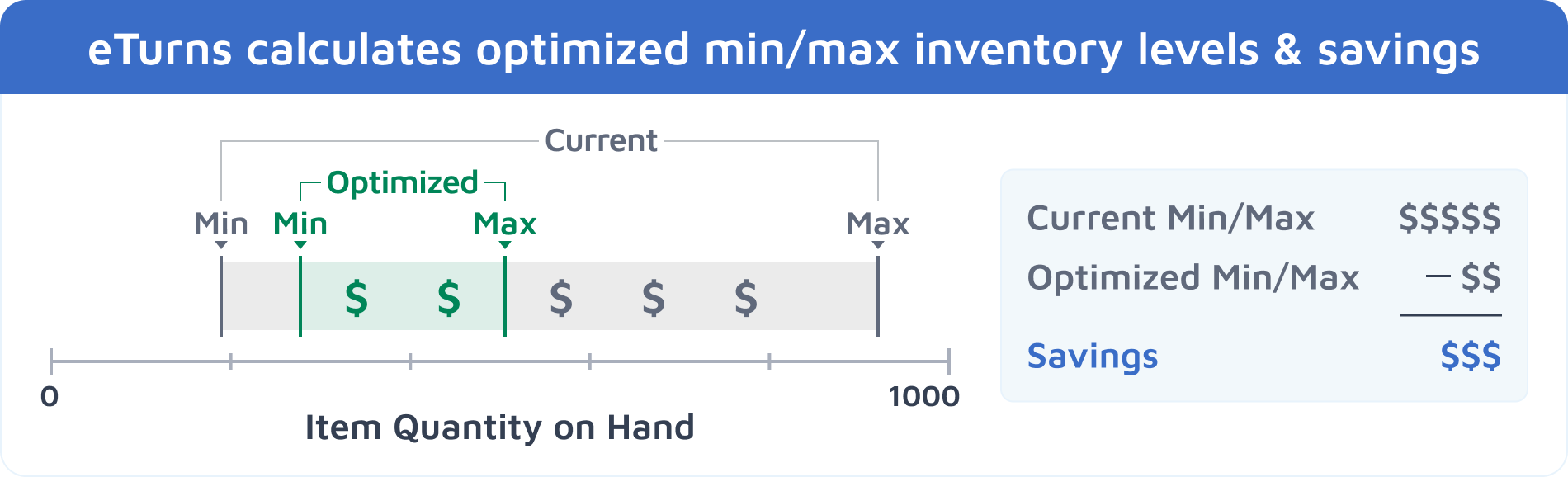
"TrackStock’s Min/Max AI Dashboard shows you how much money you can save in one-time inventory reduction as well as annual carrying costs by moving to optimized min/max levels."
Benefits Of Min/Max Inventory Management
When min/max levels are set well and reviewed consistently, the benefits can be substantial.
Fewer Stockouts
One of the biggest advantages of min/max inventory management is better service continuity. Reorder points help prevent critical items from running out unexpectedly. If stockouts are a recurring issue in your operation, this guide on the prevention of stockouts offers additional ways to reduce that risk.
Lower Excess Inventory
A min/max system puts boundaries around ordering. That makes it easier to avoid stockpiling slow-moving items or carrying more inventory than operations actually require.
Better Cash Flow
Excess inventory ties up working capital. Keeping quantities closer to actual usage needs can help free up cash for other priorities.
Lower Carrying Costs
Holding too much inventory often creates hidden costs, including storage, handling, obsolescence, shrinkage, and administrative overhead. A tighter inventory range can reduce those burdens. If you want to understand those costs more clearly, this breakdown of inventory carrying costs is a useful companion resource.
More Consistent Replenishment
Min/max levels create a more repeatable ordering process. Teams spend less time guessing and more time following a clear replenishment structure.
Better Visibility Into Inventory Needs
When min/max settings are based on real consumption patterns, they can reveal where inventory is too high, too low, or out of alignment with actual demand. Better inventory visibility is often what makes ongoing tuning possible.
"To be honest, most of the customers we have surveyed are stocking 50+% more inventory than they need and they are amazed when TrackStock shows them exactly how much they could save in a one-time inventory reduction and annual carrying costs, based on the past several weeks or months of recorded usage with our TrackStock app."
Common Challenges With Manual Min/Max Inventory Management
Min/max inventory management is straightforward in theory, but it becomes much harder to maintain when it is managed manually.
Many businesses start with reasonable stocking levels based on experience. A technician, supervisor, or storeroom manager may know roughly how much of an item should be kept on hand. That can work as a starting point, but problems usually appear over time.
Common issues include:
-
usage is not tracked consistently
-
min/max levels are set once and rarely updated
-
supplier lead times change without being reflected in inventory settings
-
one team member’s assumptions become the default for everyone
-
overstock and stockouts both increase as demand patterns drift
Manual min/max systems often break down because the inventory itself changes faster than the process used to manage it. That is one reason more teams are moving away from spreadsheets and toward manual vs automated inventory management models that make adjustments easier to sustain.
How Software Improves Min/Max Inventory Management
Software helps close the gap between theory and execution.
A strong min/max inventory management system should do more than store item quantities. It should help you track usage at the point of use, monitor replenishment activity, and adjust min/max levels based on real consumption patterns.
That is where inventory software can make a major difference.
With a point of use inventory system like eTurns TrackStock, teams can:
-
capture usage with barcode scanning, weight-based sensors, RFID, or other supported technologies
-
track inventory at the point of use
-
monitor supplier lead times and replenishment activity
-
identify where current levels are higher or lower than they should be
-
move gradually from current min/max settings toward optimized ones
-
estimate savings tied to inventory reduction and carrying cost improvement
Instead of manually reviewing every item one by one, software makes it easier to continuously tune inventory levels as usage changes. Teams exploring a full TrackStock overview can see how this approach works across stockrooms, trucks, and other point-of-use environments.
If you want to capture usage more accurately, eTurns also supports SensorBins for weight-based monitoring and RFID inventory management for environments where that method makes sense.
This is especially useful for organizations with large item counts, multiple locations, field inventory, or service environments where stock accuracy directly affects uptime. Companies trying to keep stockrooms, trucks, and jobsites in sync often need that kind of visibility to make min/max tuning sustainable.
"TrackStock allows the user to reset all of the min/maxes from the Min/Max AI Dashboard rather than entering each one manually."
How eTurns TrackStock Helps Optimize Min/Max Levels
eTurns TrackStock is designed to support self-service customer-managed inventory and vendor-managed inventory workflows. By tracking item usage and combining that data with supplier and replenishment variables, it helps users move toward more accurate min/max levels.
TrackStock can help users:
-
track consumption as inventory is removed and used
-
compare current levels to optimized targets
-
tune min/max settings more conservatively or more aggressively
-
recalculate levels over time based on updated usage
-
reduce manual effort involved in min/max analysis
-
identify where inventory reduction opportunities may exist
Rather than relying on static settings, TrackStock supports an ongoing tuning process. That makes it easier to keep min/max levels aligned with real-world demand instead of outdated assumptions. If your process involves customer-managed or supplier-supported replenishment, it may also help to understand VMI vs CMI and how those workflows affect replenishment ownership.
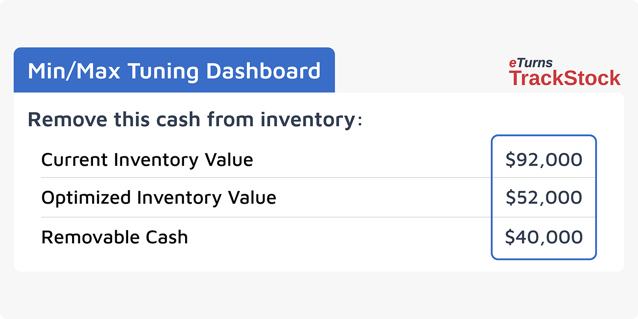
For teams that want more direct visibility into optimization opportunities based on actual usage, the Min/Max Tuning Dashboard gives users a clearer view of current levels, optimized targets, and potential savings.
Which Industries Benefit From Min/Max Inventory Management?
Min/max inventory management can be useful in nearly any environment where indirect materials, consumables, or operational stock need to stay available without becoming bloated.
Industries and use cases that commonly benefit include:
-
healthcare supply rooms and clinics
-
MRO inventory in manufacturing environments
-
contractor job site inventory
-
distributor-managed and consigned inventory
-
mining operations
-
service truck inventory
-
government and municipal supply environments
-
office, janitorial, IT, and breakroom supplies
While the item mix may differ from one industry to another, the goal is usually the same: keep inventory available without carrying more than the operation needs.
What Min/Max Reporting Should You Look For?
Good reporting makes min/max inventory management easier to act on.
Useful reports often include:
-
total usage quantity and value over a selected period
-
average daily usage
-
projected consumption before the next order
-
upcoming reorder timing
-
expected order quantity
-
inventory turns
-
inventory reduction opportunities
-
savings visibility tied to optimized levels
When this information is easy to access, inventory teams can make faster and better-informed decisions without relying on spreadsheet-heavy analysis. For teams evaluating reporting depth, customizable inventory reports and the ability to schedule reports with email alerts can make ongoing min/max management much easier to maintain. eTurns also offers alert dashboard analytics for teams that need quicker visibility into activity and exceptions.
Ready To Improve Your Min/Max Inventory Strategy?
If your team is still managing min/max levels manually, there is a good chance your inventory is drifting away from actual usage patterns over time.
A stronger process starts with better visibility into how inventory is used, how often it is replenished, and where current levels no longer match operational needs.
eTurns TrackStock helps businesses manage point-of-use inventory, tune min/max settings, and identify opportunities to reduce excess stock while improving service levels. You can explore the TrackStock overview or review the pricing page to see which option fits your inventory environment best.
Min/Max Inventory FAQs
Min/max inventory management sets a minimum and maximum stock level for each item. When inventory reaches the minimum level, it triggers a reorder to the maximum level.
Min and max levels are based on usage rates, lead times, and safety stock. Reviewing historical demand helps determine accurate thresholds.
It helps reduce stockouts, prevent overstocking, and simplify replenishment decisions across stockrooms and job sites.
Yes, it works well for manufacturing, construction, healthcare, and any business managing consumable inventory.
Software automates reordering, tracks usage in real time, and adjusts levels based on demand trends.